> ## Documentation Index
> Fetch the complete documentation index at: https://docs.superdesign.dev/llms.txt
> Use this file to discover all available pages before exploring further.
# Using Skills
> Skills are reusable AI-powered design actions you can trigger directly from the canvas prompt bar.
## What are Skills?
Skills are pre-built AI design actions available inside Superdesign. Each skill is optimized for a specific task — generating wireframes, creating landing pages, running user interviews, generating images, and more. You can also install community skills from the Skill Library or create your own.
***
## How to Open the Skills Menu
Type `/` in the prompt bar at the bottom of the canvas. The Skills menu appears instantly.
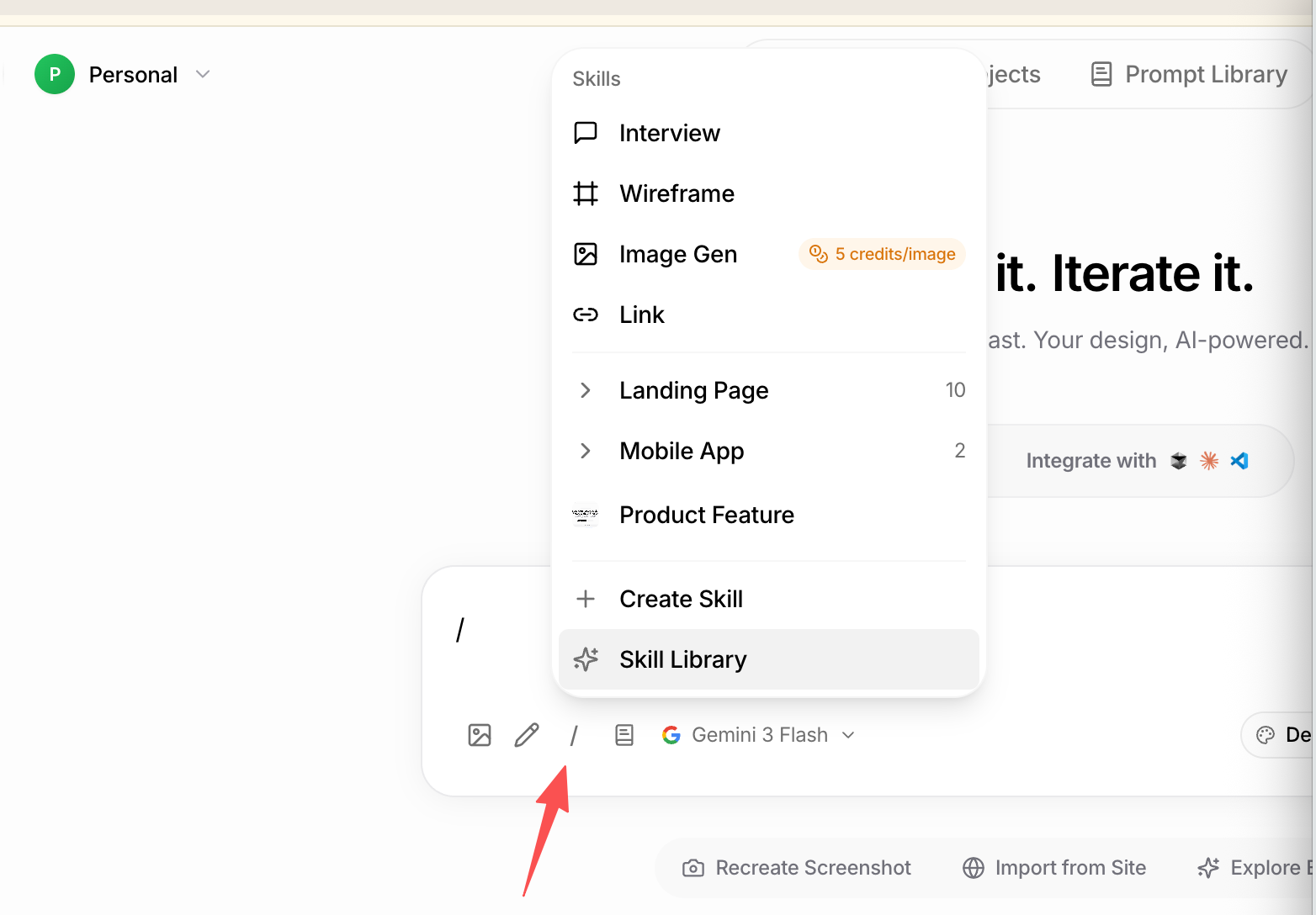 The `/` shortcut works from anywhere on the canvas — you don't need to click into the prompt bar first.
***
## Built-in Skills
The following skills come pre-installed with every Superdesign workspace:
| Skill | What it does |
| ------------------- | -------------------------------------------------------------- |
| **Interview** | AI interviews you to build a detailed spec before designing |
| **Wireframe** | Explores multiple low-fidelity wireframe layouts fast |
| **Image Gen** | Generates an image from a prompt *(costs 5 credits per image)* |
| **Link** | Links @mentioned pages together on the canvas |
| **Landing Page** | Designs a full landing page (10 presets available) |
| **Mobile App** | Designs a mobile app screen (2 presets available) |
| **Product Feature** | Designs a new product feature UI |
***
## Skill Library
The Skill Library is a collection of community-built and curated skills you can install and use instantly. Skills are organized by page type and use case, including:
**Landing Pages**
* SaaS homepage, startup landing page, agency site, portfolio
* Pricing page, waitlist page, coming soon page
* Product showcase, testimonials, feature highlight sections
**Mobile App Screens**
* Onboarding flow, login / signup, dashboard
* Profile page, settings screen, notifications
* E-commerce product listing, cart, checkout
**Product Features**
* Admin dashboard, analytics overview, data table
* User settings panel, billing page, team management
* Kanban board, calendar view, feed / activity stream
**Marketing & Content**
* Blog post layout, newsletter, email template
* Social media card, presentation slide, pitch deck slide
To open the Skill Library:
1. Type `/` in the prompt bar
2. Click **Skill Library** (✦ icon) at the bottom of the menu
3. Browse by category or search by keyword
4. Click any skill to preview it — you'll see a thumbnail, description, and the prompt it uses
5. Click **Use** to apply it instantly
Installed community skills appear in your Skills menu alongside your built-in ones.
***
## Create Your Own Skill
Encode your own design workflow or team conventions as a reusable skill.
1. Type `/` in the prompt bar
2. Click **+ Create Skill**
3. Add a name, description, and prompt instructions
4. Save — it appears in your Skills menu and can be shared with your team
***
## Installing Skills via CLI
For developers using Superdesign inside a coding agent (Claude Code, Cursor, etc.), you can install the Superdesign Agent skill directly from your terminal and invoke it with a slash command.
See the full setup guide: [Superdesign Agent Skill tutorial](https://docs.superdesign.dev/cli-skill-tutorial)
Quick start:
```bash theme={null}
npm install -g @superdesign/cli@latest
superdesign login
npx skills add superdesigndev/superdesign-skill
```
Then use it in your coding agent:
```
/superdesign help me design X
```
***
## Credits
Some skills consume credits per use. **Image Gen** costs **5 credits per image** — shown inline next to the skill name in the menu. All other built-in skills are free.
The `/` shortcut works from anywhere on the canvas — you don't need to click into the prompt bar first.
***
## Built-in Skills
The following skills come pre-installed with every Superdesign workspace:
| Skill | What it does |
| ------------------- | -------------------------------------------------------------- |
| **Interview** | AI interviews you to build a detailed spec before designing |
| **Wireframe** | Explores multiple low-fidelity wireframe layouts fast |
| **Image Gen** | Generates an image from a prompt *(costs 5 credits per image)* |
| **Link** | Links @mentioned pages together on the canvas |
| **Landing Page** | Designs a full landing page (10 presets available) |
| **Mobile App** | Designs a mobile app screen (2 presets available) |
| **Product Feature** | Designs a new product feature UI |
***
## Skill Library
The Skill Library is a collection of community-built and curated skills you can install and use instantly. Skills are organized by page type and use case, including:
**Landing Pages**
* SaaS homepage, startup landing page, agency site, portfolio
* Pricing page, waitlist page, coming soon page
* Product showcase, testimonials, feature highlight sections
**Mobile App Screens**
* Onboarding flow, login / signup, dashboard
* Profile page, settings screen, notifications
* E-commerce product listing, cart, checkout
**Product Features**
* Admin dashboard, analytics overview, data table
* User settings panel, billing page, team management
* Kanban board, calendar view, feed / activity stream
**Marketing & Content**
* Blog post layout, newsletter, email template
* Social media card, presentation slide, pitch deck slide
To open the Skill Library:
1. Type `/` in the prompt bar
2. Click **Skill Library** (✦ icon) at the bottom of the menu
3. Browse by category or search by keyword
4. Click any skill to preview it — you'll see a thumbnail, description, and the prompt it uses
5. Click **Use** to apply it instantly
Installed community skills appear in your Skills menu alongside your built-in ones.
***
## Create Your Own Skill
Encode your own design workflow or team conventions as a reusable skill.
1. Type `/` in the prompt bar
2. Click **+ Create Skill**
3. Add a name, description, and prompt instructions
4. Save — it appears in your Skills menu and can be shared with your team
***
## Installing Skills via CLI
For developers using Superdesign inside a coding agent (Claude Code, Cursor, etc.), you can install the Superdesign Agent skill directly from your terminal and invoke it with a slash command.
See the full setup guide: [Superdesign Agent Skill tutorial](https://docs.superdesign.dev/cli-skill-tutorial)
Quick start:
```bash theme={null}
npm install -g @superdesign/cli@latest
superdesign login
npx skills add superdesigndev/superdesign-skill
```
Then use it in your coding agent:
```
/superdesign help me design X
```
***
## Credits
Some skills consume credits per use. **Image Gen** costs **5 credits per image** — shown inline next to the skill name in the menu. All other built-in skills are free.